Scheduling software for EMS & Fire

EMS & fire department scheduling software that covers every shift.

Skip the phone calls. My Shift Bid posts your open shifts and lets qualified crews bid, trade, and pick up from any phone — scheduling, timekeeping, and coverage that follow your rules.

Built for EMS crews. Down to the cert.

Certifications, training, and timekeeping stay in step with every shift — so the right medic is always on the rig and every card stays current.

Built for EMS agencies and fire departments — career, combination, or volunteer.

One system for the whole operation — scheduling, timekeeping, rig checks, payroll, hiring, and training.

  • Built only for EMS & Fire
  • Handles 24/7 rotations
  • Works on any phone
  • Updates the moment things change
  • Your data is never shared
  • Follows your policies
How it works

One system from hiring to payroll

Stop juggling tools that don't talk to each other. My Shift Bid carries each step, start to finish.

  1. 1

    Hire

    Post your openings online. Applications come in organized — review, interview, and hire without the paper pile.

  2. 2

    Train

    Assign courses to new hires and current staff. Finish a required course and the matching card renews automatically.

  3. 3

    Schedule

    Set up your rotation once and the schedule builds itself. Open shifts stand out, so you catch gaps early.

  4. 4

    Trade

    Crews swap shifts and pick up coverage from their phones. Approvals take one tap, and nobody gets double-booked.

  5. 5

    Track

    Crews clock in at the station. Late and missed punches get flagged, and points follow your attendance policy.

  6. 6

    Pay

    Hours come out sorted — regular, overtime, holiday, PTO, sick — ready for ADP, Paychex, QuickBooks, and more.

  7. 7

    Operate

    Daily rig checks, tamper seals, equipment tracking, and department files, all in the same place.

Features

Everything your agency needs

Start with scheduling and add more when you're ready — one login for all of it.

Schedule Views

The whole week at a glance. Schedules build themselves from your rotation — 24/48, 48/96, day/night, or your own pattern — and open shifts stand out.

Open Shifts & Bidding

Post an open shift and qualified crews bid on it from their phones. You choose what gets approved automatically and what waits for a supervisor.

Swaps & Coverage

Members trade shifts or cover for each other with a tracked request. Both schedules update together, so nobody gets double-booked.

AI Shift Assistant

Point it at a week with holes in it. It weighs pending swaps, bids, and availability, then proposes a fill for every gap — you review each suggestion and approve with one click.

Master Shift Bid

Your annual shift bid, run online. Members pick in order, each on a timer, and everyone watches the schedule fill in live.

Timeclock

Clock in on approved station devices — not from the couch. Punches line up with scheduled shifts on their own.

Attendance & Points

Late, missed, and absent events get flagged and scored by your point system. You see patterns early, not at review time.

Payroll Export

Hours export sorted into regular, overtime, holiday, PTO, and sick — for ADP, Paychex, QuickBooks, Genesis PPG, or a spreadsheet.

Banks & Accruals

PTO, sick, and vacation banks that accrue on their own. Every change is recorded, so balances always add up.

Credentials

Every card and cert in one place, with warnings before anything expires. Unqualified members stand out on the schedule in red.

Forms & Reports

Build your own forms and checklists — no programmer needed. Assign them at clock-in and see who's late or missing at a glance.

Visual Inspection

Rig checks on a phone. Tap a cabinet on screen — it opens and shows the checklist for exactly what belongs inside.

Assets

Know where every radio, monitor, and tablet was last seen. Rig checks record equipment sightings automatically.

Seals

Numbered tamper seals for narc boxes and supply cabinets. Enter the seal number to confirm nothing was touched.

Documents

One home for SOPs, protocols, and files. You control who sees each folder, and every upload is checked for viruses.

Messaging & Notifications

Reach people where they'll actually see it — in the app, by email, text, or phone call — and know who got the message.

Applicant Tracking

Take applications online and move candidates through your hiring steps. Hire someone and their account is ready on day one.

Learning Management

Assign videos, courses, and quizzes with due dates. Finishing a recert course renews the matching card automatically.

What makes it different

Your policies, followed automatically

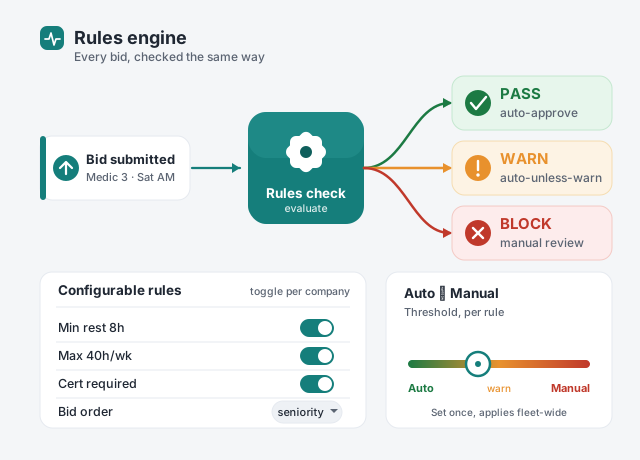
No two agencies run alike. Set your rest rules, hour limits, bid order, and point values once. My Shift Bid checks every bid, trade, and request against them — and clears the routine ones for you. You decide what still needs a supervisor's eyes.
  • Rest and hour limits that match your policy
  • You choose what's automatic and what needs approval
  • Bid order by seniority, rank, or your own list
  • Policy changed? Change a setting, not the software
A flow diagram: a submitted bid runs through a rules check and comes out approved, flagged for review, or held for a supervisor — beside a panel of example rules like minimum rest and weekly hour limits, and a dial that slides between automatic and manual.
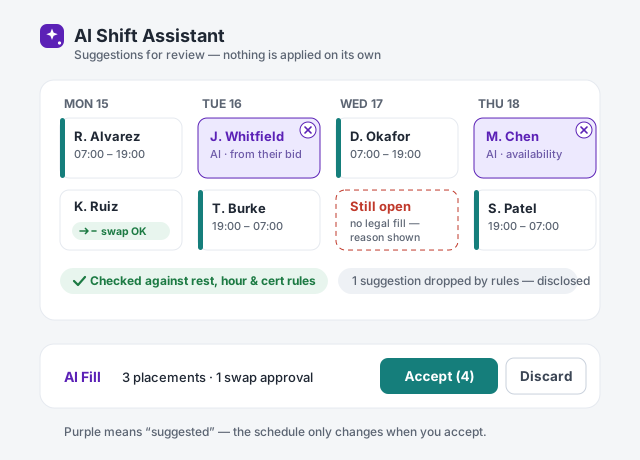
A week schedule board where the AI Shift Assistant has proposed fills: two open shifts show suggested names highlighted in purple with a small remove button, a pending swap is marked approved, and a review bar underneath shows the suggestions were checked against agency rules with one Accept button for the supervisor.
New — AI Shift Assistant

Holes in the week? Ask the assistant.

Open a week with gaps and let the assistant work it out. It settles pending swaps first, then proposes a fill for every open shift — weighing who bid, who's available, seniority, overtime, and who's the only person able to cover the hard slot. Every suggestion is checked against your agency's rules before you ever see it, and nothing touches the schedule until you approve it.
  • Settles swaps and coverage first, then fills the gaps
  • Only suggests people who actually bid or marked themselves available
  • Checks every suggestion against your rest, hour, and certification rules
  • You review on the schedule and approve — or remove any piece — with one click
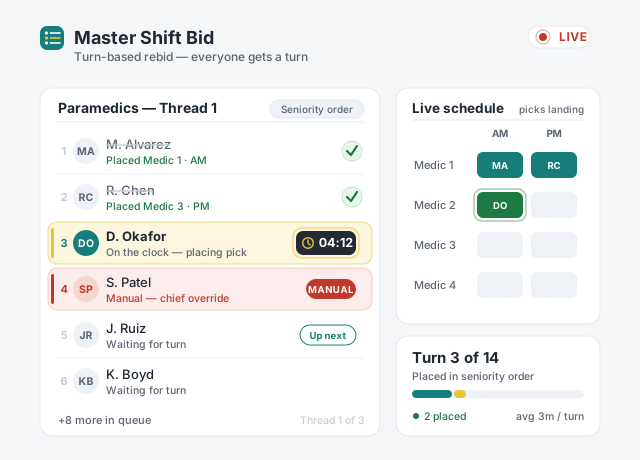
Live Master Shift Bid board for Paramedics: a seniority-ordered bidder queue where finished bidders are struck through, the current bidder is highlighted yellow with a countdown chip, a chief-override placement is flagged red, and a live schedule tile fills in as picks land — all under a LIVE indicator and a Turn 3 of 14 progress meter.
The annual shift bid

Run your shift bid online, start to finish

The yearly bid usually means a packed room, a printed roster, and a long day. Run it live instead. Members pick in order from anywhere, each on their own timer, and everyone watches the board fill in as picks land. If something goes wrong, put the whole schedule back the way it was in one click.

  • Bid order by seniority — or any order you set
  • Each member picks on a timer, from any device
  • Everyone sees picks land as they happen
  • One click puts the old schedule back if you need it
Daily rig checks

Rig checks done right, in minutes

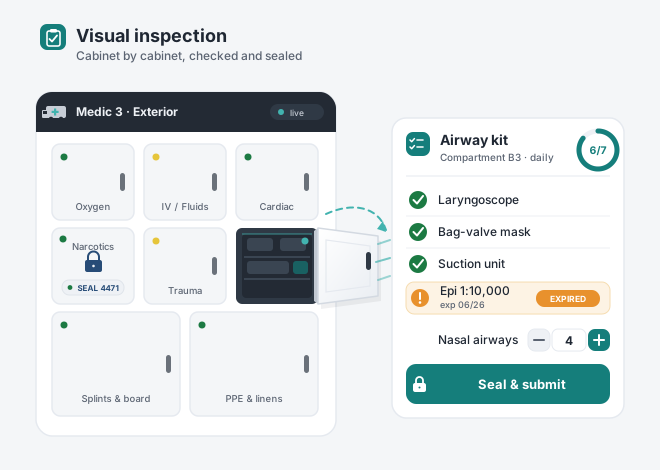
Open your rig on a phone and tap a cabinet. It swings open on screen and shows exactly what belongs inside. Check items off, flag anything expired, and seal it when you're done. Every rig gets its own layout, so the check always matches the truck.
  • Tap a cabinet to see what belongs inside
  • Expired supplies get flagged on the spot
  • A matching layout for every rig in the fleet
  • Numbered seals confirm a cabinet stayed shut
Schematic ambulance cabinet wall for a rig called Medic 3, with eight labeled compartments each showing a status dot. The Narcotics cabinet is sealed with a padlock and numbered seal chip, and the Airway kit cabinet is swung open on a hinge with a checklist flying out showing a six-of-seven progress ring, green-checked items, an orange EXPIRED exception row, a quantity stepper, and a Seal and submit button.
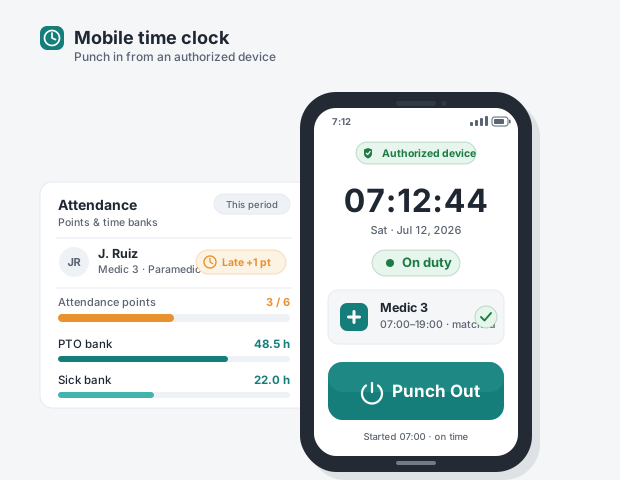
A phone showing a mobile time clock with a green On duty status, the large current time, a matched shift line for Medic 3 (07:00–19:00), an authorized-device shield chip, and a large teal Punch Out button; beside it an attendance card shows a Late plus one point chip, an attendance points meter, and PTO and Sick time-bank balances.
Timekeeping & attendance

Punches you can trust, hours that add up

Crews clock in on devices you approve — at the station, not from home. Each punch lines up with the scheduled shift on its own. Late or missed punches get flagged and scored under your attendance policy, and PTO and sick banks stay current without spreadsheets.

  • Clock in only from devices you approve
  • Punches match the schedule automatically
  • Late and missed punches flagged for review
  • Attendance points that follow your policy
Hiring & training

From application to first shift in one flow

Post the job and take applications online. Move candidates through interviews and offers, and when you hire, their account, certs, and first courses are set up in one step. When someone finishes a required course, the matching card renews on its own.
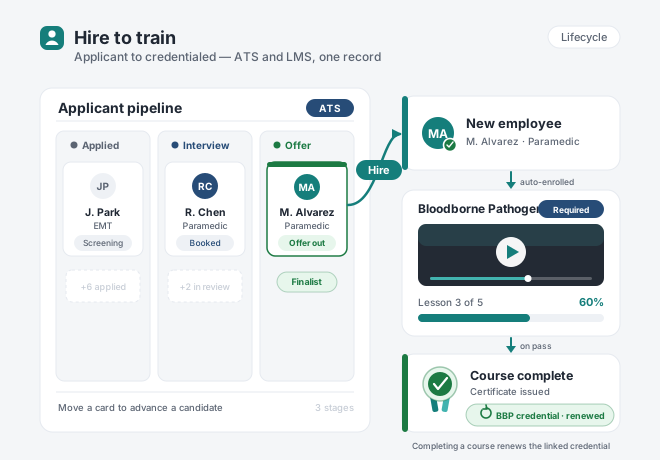
  • Applications come in online and organized
  • Move candidates through stages with a drag
  • New-hire accounts and certs ready on day one
  • Finishing a course renews the matching card
Hiring-to-training flow: a hiring board with Applied, Interview, and Offer lanes each holding a candidate card and the finalist highlighted green; a teal Hire arrow to a New employee card; a downward flow into a training course card with a video player and a 60 percent progress bar; then a course-complete certificate badge with a green chip showing the matching credential renewed.
Security & trust

Your data, protected

Built for agencies that answer to the public — privacy and accountability come standard.
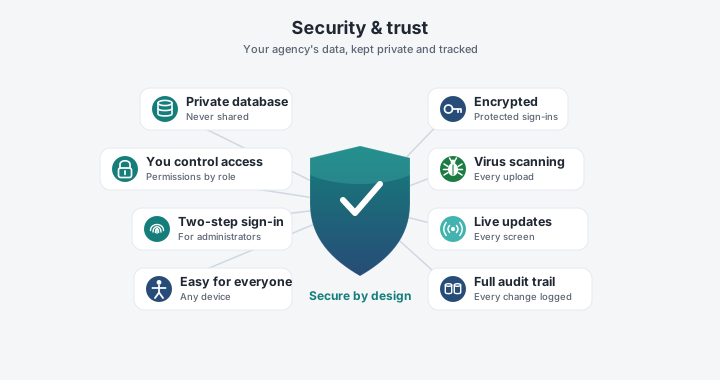
A central teal-to-navy shield with a white checkmark, ringed by eight trust badges: private database, encrypted, access controls, virus scanning, easy for everyone, two-step sign-in, live updates, and full audit trail.

A private database for your agency

Your data lives in its own database. It is never mixed with another agency's.

Protected sign-ins

Strong password protection, plus extra sign-in verification for administrators.

Every upload is scanned

Files are checked for viruses before anyone can open them.

A record of every change

Every action is logged — who did it and when — so audits are simple.

You control who sees what

Permissions by role and group, down to a single folder or form.

Nothing to install

Works on phones, tablets, and station computers — and it's built to be readable and usable for everyone.

Always current

Schedules and boards update on every screen the moment something changes.

Set up around your agency

Your rules, your banks, your point system, your branding — we set it up with you.

Pricing

Straightforward pricing

Every plan includes the whole platform — SSO and MFA too. Pick by the size of your agency, and save two months when you pay yearly.

Small
$500/mo
Up to 50 users
Medium
$750/mo
Up to 100 users
Large
$1,000/mo
Up to 150 users
Enterprise
Custom
150+ or multi-agency
One
Login for scheduling, timekeeping, forms, hiring, and training
24/7
Built for round-the-clock rotations and long shifts
5
Payroll exports — ADP, Paychex, QuickBooks, Genesis PPG, or spreadsheet
0
Apps to install — it runs on any phone, tablet, or computer
Questions

Frequently asked questions

EMS agencies and fire departments — career, combination, or volunteer, from one station to many. Crews, supervisors, chiefs, and office staff all work in the same system, and each person sees only what their role allows.

Yes. The schedule, bidding, trades, time off, rig checks, and training all work on any phone, tablet, or computer. There is nothing to install — it runs in the web browser your crews already have.

Yes. Set up 24/48, 48/96, day/night, part-time, or your own custom pattern once, and the schedule builds itself from there. Split shifts, long shifts, and mid-shift changes are all supported.

Yes. Your agency's data lives in its own private database and is never mixed with another agency's. Connections are encrypted, every upload is scanned for viruses, administrators can add extra sign-in verification, and every change is logged with who made it and when.

Switching is setup, not a software project. We build your rotations, rules, point system, banks, and credential list with you, to match how you run today. If a policy changes later, you adjust a setting yourself — no calls to support, no waiting.

Plans start at $500 a month for agencies up to 50 users, and every plan includes the whole platform — no per-feature fees. Pay yearly and you get two months free. See the full pricing for every tier, or get a demo and we'll help you pick.

See it with your own schedule

Bring your current schedule to the demo. We'll build your rotation in My Shift Bid and show you how bidding, trades, and rig checks would work for your crews. Tell us a little about your agency and we'll reach out.

We'll only use this to set up your demo — no mailing lists, no sharing.